

Here's a statistic that made me sit up straight in my chair recently: The average South African spends 23 hours and 42 minutes on WhatsApp every month*. That's well above the global average, and ahead of both Facebook and Instagram locally. There's so much buzz around brand-new and AI-driven solutions for guest communication, chat assistance, and automation that it's easy to overlook the importance of how travellers in your market segments actually prefer to communicate on the average day. That made me wonder how many Springnest-powered websites actually use our WhatsApp widget. The verdict: just over half.
Which led us to two things:
- There's an opportunity for more properties to benefit from this feature.
- If we're going to invest development time at Springnest, let's do it where our customers already find and seek value.
So here you go 💁
What's New?
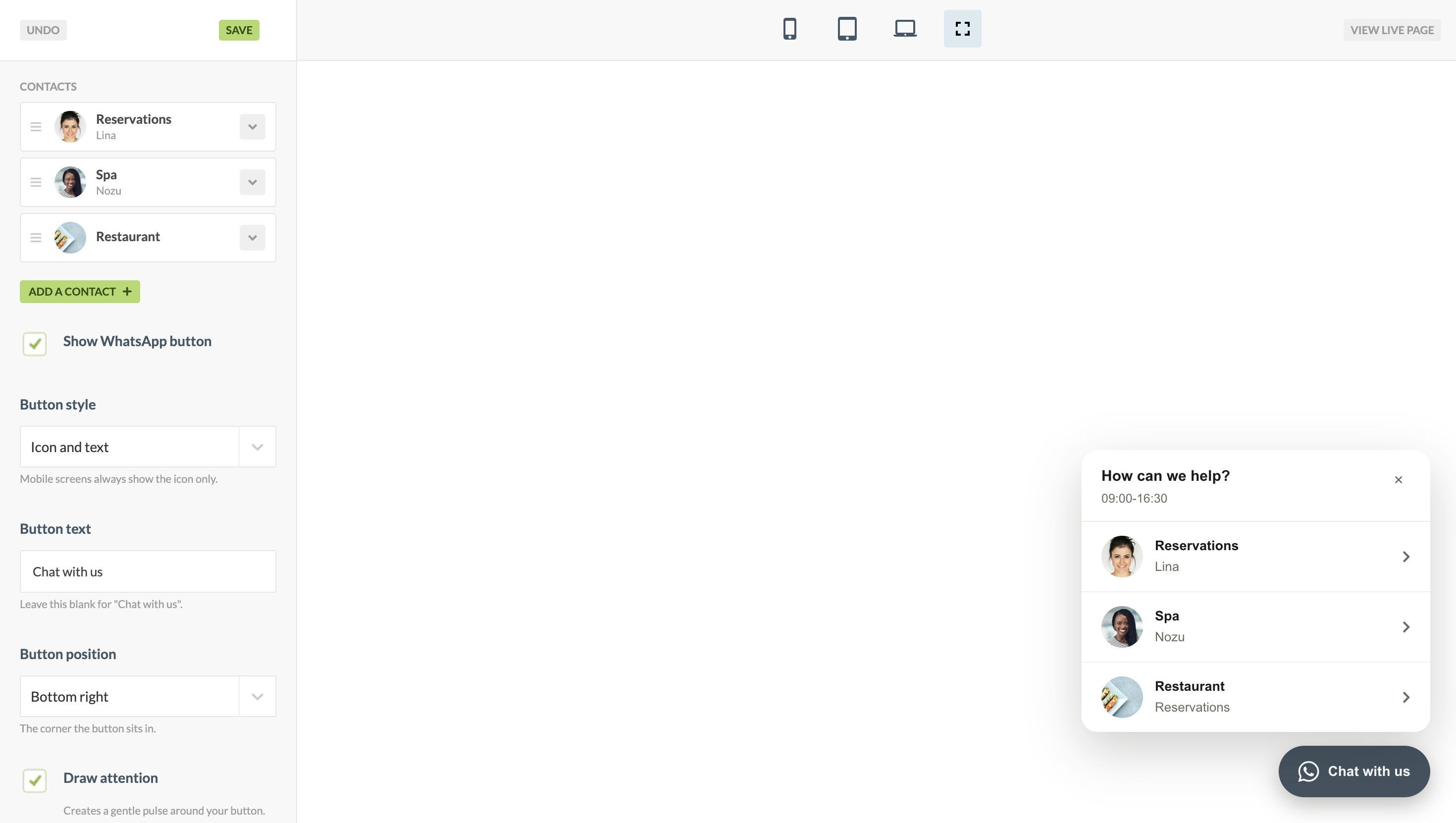
- Add multiple WhatsApp contact numbers and guide your visitors to the relevant department or person.
- More styling options for your WhatsApp button's appearance and position
- Add optional contact or office hours to help shape expectations.
- An option to enable WhatsApp calls via the widget
- An optional effect to draw attention
- A new live preview editor view for you to set up and configure your widget
What if I already had the widget live? Should I update anything?
The design updates already apply to your live widget; there's nothing you need to do from your end. For the new functionality, like multiple contacts, personalisation, and your welcome message, you can visit the widget in Springnest Admin to experiment and see what's new.
I've never used this feature before, how can I get started?
The WhatsApp widget is included in all Springnest plans and can be configured in the Widget Centre in Springnest Admin. Here's a detailed guide in the Help Centre on how to activate and personalise yours (worth reading the "questions to ask" section below before you get going).
Questions to ask before Adding the WhatsApp widget to your Springnest website:
Do I need it?
More buttons do not mean more bookings. There is a point where too many elements or calls to action can confuse or disorientate visitors rather than help them. If you already have a third-party chat widget, bot, or AI assistant live on your site, think twice before adding the WhatsApp button.
Are you ready to be available?
Responding to chat enquiries in a timely manner is key. Even if you're able to indicate that you are unavailable, or communicate a realistic response time to shape expectations, you'll need to consider that visitors will expect a relatively fast response, if not an instant one.
Is your team onboard?
Before adding any messaging or chat functionality to your website, ensure that the relevant personnel are trained and familiar with the tools. WhatsApp is as real a communication channel as email or telephone; make sure it is treated with the same level of professionalism. Decide who's responsible for responding to enquiries, and set clear expectations and actions.
*Research conducted and published by Yazi in July 2026
This was written by a human 👋
We strive to be transparent about when and how AI is used during communication and content creation by our team.
- This article was conceptualised, written, proofed and published by a human.
- Generative AI was used for researching and validating the statistics shared in this article.
- Generative AI was used to create the illustration on the Index page for this article.